

How can you protect yourself against cyber criminals?
This blog post was originally sent as an email to my clients as one of my “quarterly newsletters” a few months back. And then I thought “why not just keep it up permanently on my website to share with all?” So that’s the basis for this blog!
A few months ago, unfortunately, I had a friend (not a client) who was the victim of identity theft. He ended up hiring a cyber expert to assess his situation and I chatted with him to pick his brain after the dust had settled.
Here are some applicable tips that he shared with me to help keep your information safe.
I’m highlighting the “Top 5”, which I am self-identifying as a combination of most critical + easiest to implement. Then there are 10 more tips that you can read if you really want to start locking things down.
Why, as a financial planner am I sharing tips on preventing cyber crime? Because as much as it is my job to help you grow your wealth, I think it’s also my job to help you protect against (low probability but high impact) catastrophic events as well. Simple as that.
Top 5 Ways To Protect Your Sensitive Information:
1. Enroll in Two-Factor Authentication (2FA) – but not the text-based kind.
2FA across all accounts is absolutely critical. However, if possible, you should avoid 2FA that sends text messages to your phone. Unfortunately, many institutions only allow for this type of text-based dual authentication. But it is the least secure because of the potential for fraudsters to “steal” your SIM card by spoofing your phone number. Instead, try to use an app-based 2FA such as Google Authenticator, Symatec VIP, or other.
Schwab 2FA opportunity: When you log into Schwab, use Schwab’s app-based 2FA (not the text message!) and require it for every login.
2. Lock your eSIM via your mobile carrier and only allow for in-person changes
Log into your mobile carrier's website or app. Navigate to “Security” and then toggle “On” for SIM Protection. This prevents someone from “swapping” your eSim without your permission. It will look something like this (see below). Then, as a secondary step, request via your phone carrier that only in-person SIM card adjustments are allowed.
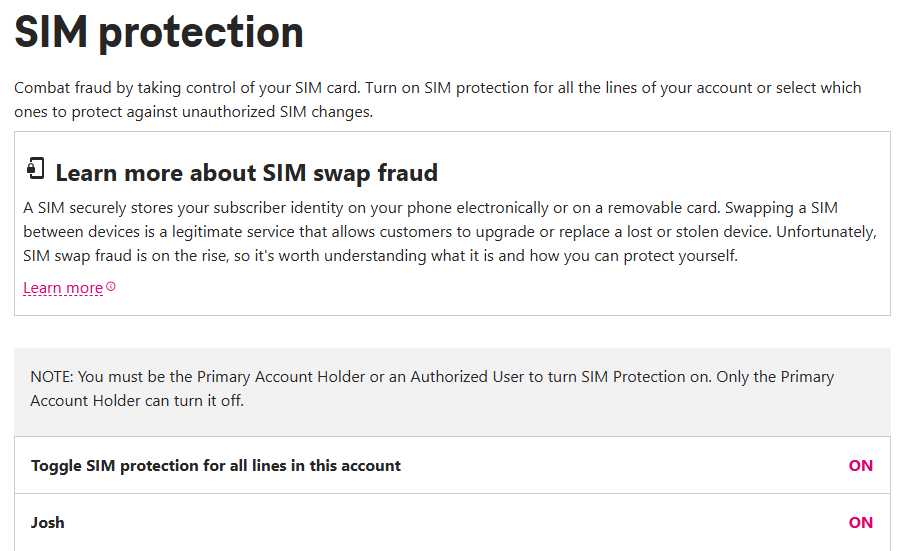
Toggle SIM protection to help prevent your phone number from being “spoofed”
3. Freeze your credit at all three bureaus
There are three credit bureaus: Experian, Transunion, and Equifax. You need to request a “freeze” at each of them and doing so is free. The benefit here is that a credit freeze prevents anyone from opening up a mortgage, credit card, phone line, etc. in your name. If/when you ever need to get a credit check (i.e. for mortgage applications, credit card applications, new phone lines, etc.) you can pretty easily toggle these credit freezes on and off via the respective apps.
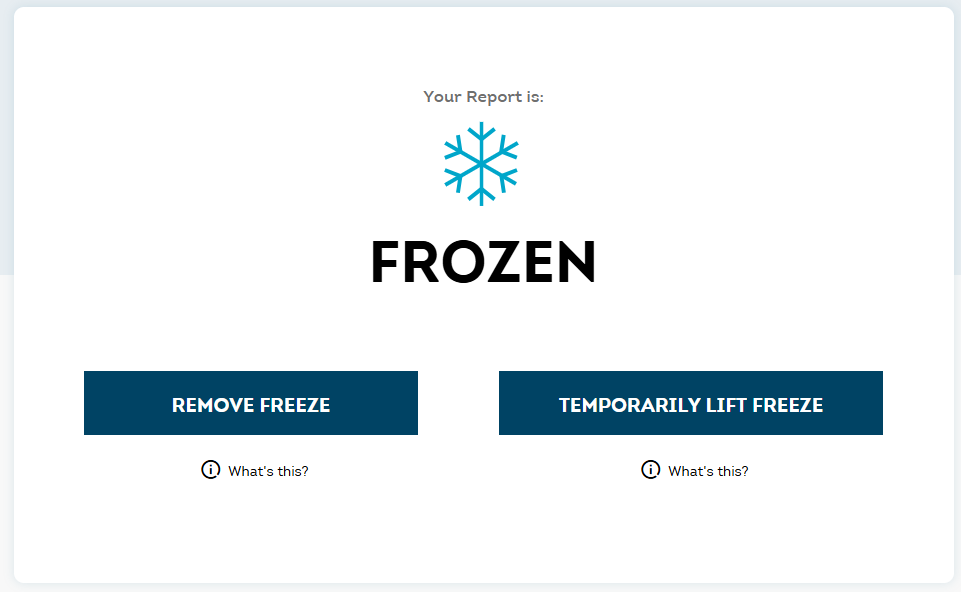
Here is what you’ll see after you’ve placed a credit freeze on your account via Transunion. Remember — it’s free to do so!
4. Scrub your online profile from brokers
The bad news is that your personal information is probably already on the dark web. The good news is that services like joindeleteme.com (I have no affiliation with them) help to scrub that data from online brokers and other platforms as much as possible. It’s not perfect, but it helps. Side anecdote: I Googled myself recently and found my voter records + address available to all. I sent a note to DeleteMe and they got my info removed from that site. So that felt like a worthwhile win. If you live in California: California has this new program called “Delete Request and Opt-out Platform” (DROP). The program basically gives you more control about the info that data brokers collect and sell about you. I recommend that you enroll in it! Delete Request and Opt-out Platform (DROP) - privacy.ca.gov
5.Bifurcate your email addresses
You should have, at minimum, both a “junk” email address and a “personal” email address. Be very selective with who receives your “personal” email address and give everyone else your “junk” email address. Send all subscriptions, newsletters, receipts, shipping notifications, etc. to the “junk” address.
So You Want to Do More? Here are 12 Additional Preventative Measures:
1. Don’t give out your social security number to your doctors or dentists
I see this happen all too frequently – at the doctor’s office, at the dentist’s office, etc. NONE of these providers need your social security number. They only want it for ease of use (laziness imho), when the reality is that they have numerous other ways to verify your information in the system. Refrain from sharing this information with them.
Likewise, if you call in over the phone and the person on the other end of the line asks for your SS# to verify your identify, ask them for alternative ways to self-identify without providing your social security number. Luckily, there are almost always multiple ways to authenticate without needing to provide your social.
The only time you might have no choice but to share your social security number is with: 1) tax preparers and/or the US government 2) a lender, landlord, credit card, or telephone company that needs to run a credit check or 3) your employer. Pretty much no one else needs to know your social security number.
2. Enroll in Google’s Advanced Protection Program if you have Gmail.
Your Gmail is the one account (aside from maybe your Apple ID) that you really want to protect. Opting-in to Google’s Advanced Protection Program is a way to get the latest protection layer against cyber threats and phishing attacks. It requires a passkey (instead of a password) and is probably a good option for many.
3. Turn on all security notifications from banks and credit cards
It might be annoying, but opting into alerts for any actions — from withdrawals to login notifications to new account creations — can help to identify suspicious activity early on. If you do get a suspicious notification, don’t click on any link within that email. Rather, locate your debit/credit card and call the number on the back of the card.
4. Limit cash within checking/savings accounts and put low limits on account withdrawals
Checking and high-yield savings accounts are typically the most vulnerable to fraud because the funds are just sitting in cash. Whereas with a brokerage account, the funds are actively invested in something which requires a "sell" transaction to take place before the investment can be converted into cash.
Limit the cash on hand within checking accounts to ~60 days worth. Then, set up auto-deposits to investable accounts and also place a max withdrawal limit.
5. Request an Identify Protection (IP) PIN from the IRS
Even if you haven’t (yet) been subject to any tax scams, you can request an IP Pin from the IRS. This pin, which changes annually, is required when submitting your tax return. This helps to prevent scammers from fraudulently submitting a tax return on your behalf and banking any refund that you have.
6. Use mobile hotspotting and/or virtual private networks at hotels, airports, and coffeeshops.
The free wifi is slow and shitty anyway. Mobile hotspotting is your best (and most secure) bet. Don't bother with any "free" wifi networks. Use your phone.
7. Set up a separate, “Guest” wifi for anyone who uses the internet at your home.
In other words, limit who is using your primary wifi channel. For all guests, have them to connect to the wifi on a “Guest” network that isn’t the primary wifi that you use each day. Again, we're trying to mitigate who (un)intentionally has access to vulnerability points.
8. Get a password manager and use the "auto generate" password feature.
Password managers, such as 1Password, are inexpensive and highly useful. I’ve found these to also be a big win when trying to share passwords securely with my wife. Instead of texting her the password, I just share it securely via 1Password. Also, humans are notoriously bad at picking passwords. Let the password manager pick one that is at least 16 characters long.
9. Don’t send any confidential information via email.
Email is not secure. Don’t send passwords or documents via email, either. Rather, use a secure portal for all sensitive information. If you don’t have a secure portal, try to password protect the document via Adobe or other tools before sending it.
10. Turn On Apple’s Stolen Device Protection
Stolen Device Protection adds a layer of security by protecting your accounts and personal information in case your iPhone is ever stolen. More details here: About Stolen Device Protection for iPhone - Apple Support
11. Lock your SSN via “E-Verify”. This isn’t the same as generating a credit freeze. Rather, it prevents your SSN from being used in the E-Verify employment eligibility system so that an identity thief cannot use your SSN to pass an I-9 employment verification check. If someone works under your SSN, their wages get reported to the IRS under your identity, which creates a tax liability you didn't incur and potentially distorts your Social Security earnings record.
12. Block “Electronic Access” via the Social Security Administration. Most of us Millennials aren't thinking about Social Security yet, even though we should be (at least from a protection standpoint). If a fraudster creates a mySocialSecurity account in your name before you do, then they own it. And then they can reroute your future benefit payments or change your address on file without you knowing until it's way too late (think: decades later, right when you actually need those benefits). The fix is simple: go to ssa.gov, create your account, and toggle on "Block Electronic Access" — no one can touch your SSA record online until you turn it off, and you can reverse it anytime.
Well, that’s what I learned from my friend who learned this the hard way. Hope this helps a bit and stay vigilent!